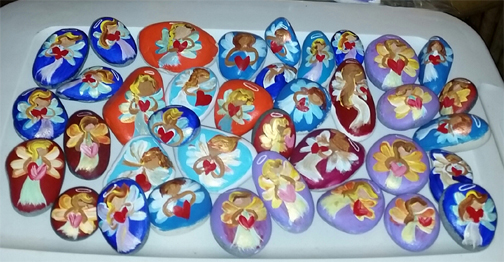
 On July 24, 2017, I began painting rocks. It began as an easy creative outlet and it’s turning into a mission. On Facebook I saw the colorful rocks with messages people were creating, finding and leaving and I thought, “How cool, create something uplifting for a stranger to find and be inspired by.” I liked the idea of painting hopeful messages on rocks and I began to think about what kind of message would really be meaningful to me if I were to happen upon it written upon a rock. Then I started thinking about what images comforted me when I looked at them and the image of the cartoon angel holding the heart out came to mind. That’s always been a favorite image. I tried sketching the few prototypes and settled on a few I kind of liked. But it was when I began painting them that change began taking place. At first I was painting each one, one at a time, trying to get the mechanics of it into my muscle memory. Creativity doesn’t always flow spontaneously for me. I’ve learned sometimes I have to prime the pump. When I began the painting and the different color combinations, my mind relaxed its hold and the brush took on a life of its own. There is more to this story that i’ll write about as soon as I get a chance. Painting is an excellent focused, moving meditation. It puts me into an excellent headspace to listen to my intuition and receive inner guidance. In 2014 I did a series of paintings as a form of shamanic soul retrieval and wrote about it here.