
 The humidity finally broke enough for me to venture outside for some yard work. I love being all woodsy but that means I don’t get the breezes until they’re almost gale force. The thermometer said 72 outside this morning but 93% humidity and no breeze makes it feel about 80. It felt good to be outside without being wrapped up like a beekeeper to keep mosquitoes at bay. I was going to simply take a walk, but I know me so I dressed to go into the deep woods and stuck hand pruners in my back pocket. In my yard, I can get quickly overwhelmed if I ask “where to start?” I’ve learned to have some basic tools at hand then just take a stroll and be ready for whatever unfolds before me. I try to do the same with life. Continue reading
Category Archives: Uncategorized
How to REALLY get Picasa off your Samsung Galaxy S5

I Googled “how to remove Picasa photos from Samsung Galaxy S5” and got a lot of mis-information to perform commands my S5 doesn’t even have. They got all complicated and some said you can’t do it on your phone at all. Not so. Here’s the fix:
— Go to Gallery
— Click the 3 dots to the right of the camera icon
–Click “Content to Display”
__Uncheck “Content in Picasa”
You’re welcome.
How to Factory Reset Your Galaxy S5 and Restore factory default settings
 If your phone gets slow or doesn’t work as it usually does, it may help to restore the factory default settings. All settings and configurations you’ve made on your phone are deleted.
To do a Factory Data Reset
Press the settings icon.
Press Backup and reset.
Press Factory data reset.
Restore factory default settings
Press Reset device.
Press Erase everything.
It will say all your personal information, pictures, files and applications will be erased, but don’t freak. It restores it also. Wait a moment while the factory default settings are restored. Follow the instructions on the display to set up your phone and prepare it for use. Continue reading
The best and worst forms of magnesium to take
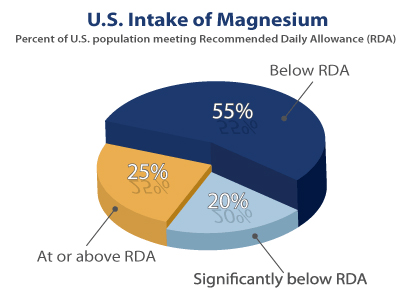 Happy dance! I just learned there are different types of magnesium and there’s a specific one for me. See below to see if one might benefit you. It took me awhile to figure out I had a deficiency since I didn’t recognize the symptoms. A sleep disorder from an old head injury alternates me between insomnia and hypersomnia so I can’t always tell if I’m sleepy or if I’m fatigued. I’ve had the fatigue 20+ years and have learned it doesn’t matter if I lie around and do nothing or if I run around and do everything I need to do. I discovered I don’t feel any more fatigued when I run around, so I make myself do it. Continue reading
You don’t need to plan your entire life out, just plan the next step and wait for inspiration
 I went to the bank today to make some changes and had a great conversation with the guy who helped me. I asked what kind of name his was and he told me it was Biblical. I asked what it meant and he told me the story around it. I told him it sounded like a writer’s name. He saw the account name Horizons Magazine and asked what kind of magazine it was. I was glad he mentioned “biblical” as that helped me know how to answer him. I told him it was Florida’s body mind spirit magazine and I asked if he knew who Wayne Dyer was. He did not. He was 24. I said he was a best selling author in the field I was in, and that he was on this month’s cover. Continue reading
When your conscience begins to bother you about your past actions, that’s your Soul wanting you to wake up
 I worked for criminal defense attorneys for 22 years. We represented a lot of repeat offenders, some who’d done serious prison time for often violent crimes. Inmates and defendants would call for their attorney and as the paralegal, I’d be the one who took those calls. I heard all their stories and there was a definite pattern of them reaching a point where their conscience began bothering them. I was interested in the timing astrologically as it often came at the Saturn returns (ages 28-30 and 58-60) and the Uranus Opposition (ages 39-42), typical times for personal reflection. Not everyone is pleased with what surfaces in their mind when they look back on their life. The thing about people who do not-nice things: at some point their conscience is going to catch up with them and give them a vivid review of their entire life, everything they’ve done that was unkind and shady will come to mind. Come back to haunt them, as it were. When your conscience begins to bother you about past actions, that’s your Soul wanting you to wake up. You want to wake up also, because when you wake up to the deeper you, your life becomes more expansive and joyful, more meaningful and fulfilling. Continue reading
A forgetful mind makes you stay in the Here and Now
 A friend’s elderly wife is getting forgetful. When she realizes it afterwards, she feels like a burden to him. He assured her as long as they stay in the Here and Now there is no need to remember anything other than they love each other and take it moment by moment. He is honored to hold the sacred space to be her memory for her when she needs it.
The awkward moment when a friend announces she’s hooked up with a sociopath
 The awkward moment when you see a friend post on Facebook that she’s in a relationship with someone you know to be a sociopath who historically overlaps engagements. Some long time friends have never seen his crazy come out. Sometimes it takes awhile. Like the first time you have a disagreement, ask him to get a job or pay a bill. He is clearly not like this with everyone, and the point isn’t about one person. This is a caveat to know who you’re dealing with. In the past, I’ve kept quiet to the detriment of several situations. Take the time to know someone. It doesn’t matter to me if there are 200 people I trust telling me what a great guy someone is around them. I can’t pretend I don’t know firsthand what one man is capable of. Even now a year later he’s suing the fiancee he left 2 years ago. He’d fooled her twice. In July 2011, I wrote about The ladies man who presents himself as a guru and a soulmate. In August 2013, his then- fiancee made a Facebook post she was heartbroken and devastated that he could leave her, literally bedridden, after promising he was brought into her life to help her heal from other physical problems. I know him to be a sociopath and a narcisscist a decade before her. I sent her a note of support and we had a brief private conversation. Continue reading
Why Rain Dances Work. A Five Step Process and Why Holding the Vision is Important

They could use some rain in the western US. We can help by giving it a little thought time each day. Really, we can help with just a few minutes each day. As we gain group consciousness, science has proven we have the power to create, alter and shape things on Earth. Including the weather. Weather is not easy to influence by a single individual, but it may be influenced by a group consciousness (as evidenced by tribes doing it in their rain dances). Weather is strongly influenced by Earth resonance frequencies, the so-called Schumann frequencies. But those same frequencies are also produced in our brains, and when many people synchronize their thinking or individuals focus their thoughts in a laser-like fashion, then it is scientifically speaking not at all surprising that they can thus influence weather. Continue reading
Spirit directs me when others are better suited for particular work
 I spoke last week to someone who said he needed an emergency house clearing done and he’d pay anything for it. I told him first of all, never call a psychic and say those words. I was finishing the October Horizons Magazine and told him I could speak to him in a few days and gave him several simple things to do in the meantime to start a clearing process. I knew he had a serious situation but I wasn’t sure I was the one to handle it. With some energies, I’ve learned there are others better suited for that work. In spirit contact and ghostbusting, I’ve learned that how I perceive what I observe determines how it will interact with me. Continue reading